
RAG / Knowledge Base
HelperIQ ships a built-in RAG (Retrieval-Augmented Generation) pipeline backed by pgvector. Knowledge sources are vectorised on a schedule, and the agent-facing "Generate Response" button performs a cosine-similarity search to find supporting context for an AI-drafted reply.
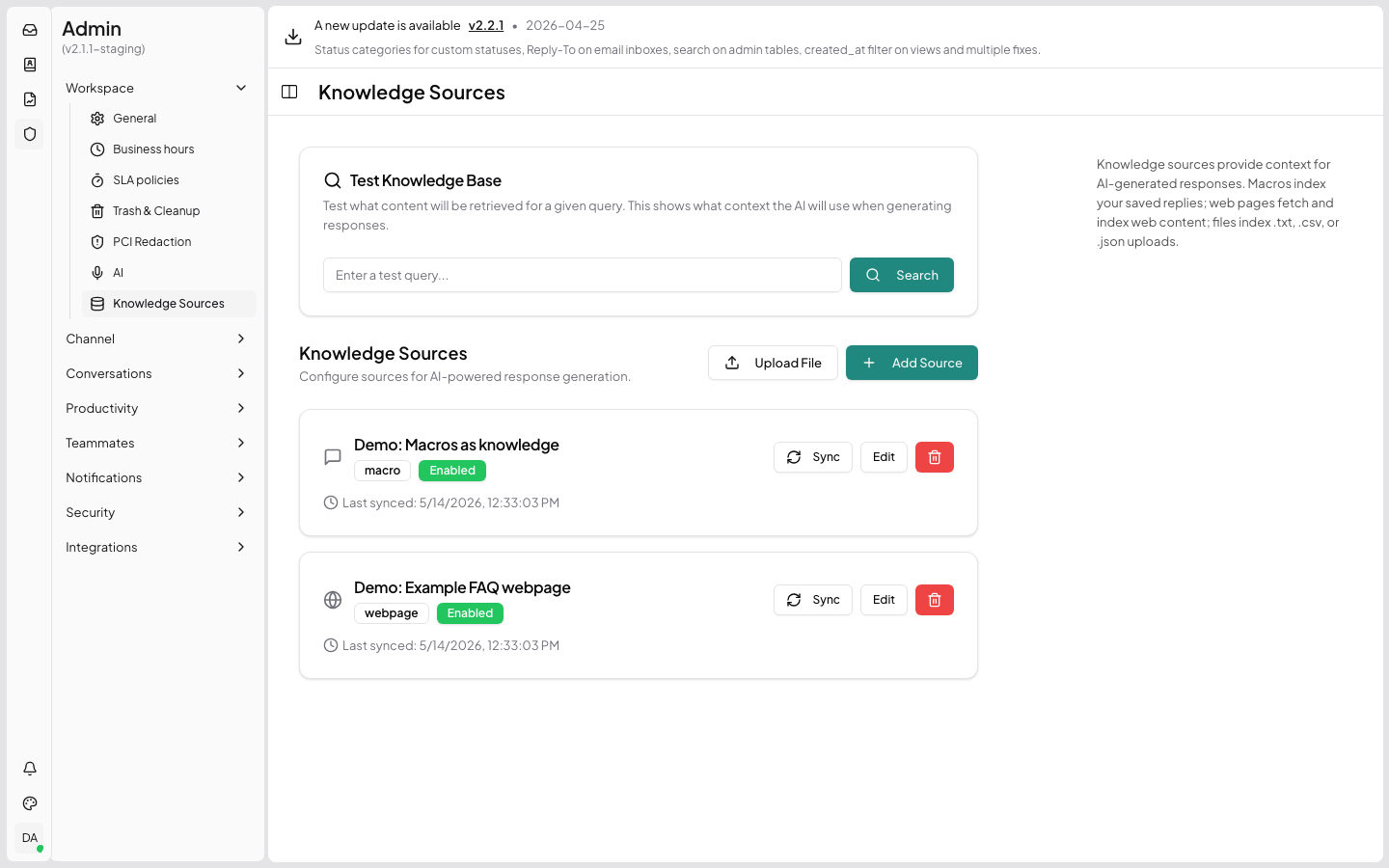
This page documents the REST surface for managing knowledge sources and invoking generation.
| Method | Path | Permission |
|---|---|---|
GET | /api/v1/rag/sources | ai:manage |
GET | /api/v1/rag/sources/{id} | ai:manage |
POST | /api/v1/rag/sources | ai:manage |
PUT | /api/v1/rag/sources/{id} | ai:manage |
DELETE | /api/v1/rag/sources/{id} | ai:manage |
POST | /api/v1/rag/sources/{id}/sync | ai:manage |
POST | /api/v1/rag/upload | ai:manage |
POST | /api/v1/rag/search | ai:manage |
POST | /api/v1/rag/generate | messages:write |
Source types
source_type | What it stores | config shape |
|---|---|---|
macro | Reply macros (templates) — auto-imported from the macros table | {} |
webpage | HTML pages crawled from a URL | { "url": "https://...", "crawl_depth": 2 } |
custom | Free-form text snippets pasted into the admin UI | { "snippets": ["...", "..."] } |
file | Uploaded documents (.pdf, .txt, .md, .docx) | { "uploads": [{ "filename": "...", "media_uuid": "..." }] } |
The source_type is immutable after creation — different types use incompatible config schemas. To change the type, delete and recreate the source.
List sources
GET /api/v1/rag/sourcesReturns all configured knowledge sources, ordered by creation time.
Response:
{
  "data": [
    {
      "id": 1,
      "name": "Public help articles",
      "source_type": "webpage",
      "config": { "url": "https://help.example.com", "crawl_depth": 2 },
      "enabled": true,
      "document_count": 184,
      "last_synced_at": "2026-05-13T20:00:00Z",
      "created_at": "2026-04-01T10:23:00Z",
      "updated_at": "2026-05-13T20:00:00Z"
    }
  ]
}
Get one source
GET /api/v1/rag/sources/{id}Create a source
POST /api/v1/rag/sourcesBody:
| Field | Type | Required | Notes |
|---|---|---|---|
name | string | yes | Display name shown in admin UI. |
source_type | string | yes | One of macro, webpage, custom, file. |
config | object | yes | Shape depends on source_type. |
enabled | bool | no | Defaults to true. Disabled sources are skipped during search. |
Example — webpage:
POST /api/v1/rag/sources
Content-Type: application/json

{
  "name": "Public help articles",
  "source_type": "webpage",
  "config": {
    "url": "https://help.example.com",
    "crawl_depth": 2
  },
  "enabled": true
}
Errors:
400 InputError—nameempty,source_typenot in the allowed set, orconfigmissing required fields for the chosen type.
Update a source
PUT /api/v1/rag/sources/{id}Accepts name, config, enabled. source_type is rejected if present (see note above).
Delete a source
DELETE /api/v1/rag/sources/{id}Cascades to all rag_documents rows for that source.
Trigger a manual sync
POST /api/v1/rag/sources/{id}/syncEnqueues a sync job. For webpage sources this re-crawls; for custom and file it re-embeds; for macro it picks up newly-added macros.
Returns 202 Accepted immediately — sync runs in the background. Watch last_synced_at on the source row to know when it finishes, or check document_count for the new total.
Scheduled sync
A background coordinator re-syncs all enabled sources every hour. The manual endpoint is for "I just added 50 articles and want them indexed now".
Upload a file for indexing
POST /api/v1/rag/upload
Content-Type: multipart/form-data
Used by the admin UI's "File" source type. Accepts .pdf, .txt, .md, and .docx. Returns a media_uuid to add to the source's config.uploads array.
Form fields:
| Field | Type | Required |
|---|---|---|
file | file | yes |
Response:
{
  "data": {
    "media_uuid": "8c3d9e1f-…",
    "filename": "product-manual.pdf",
    "size": 524288
  }
}
Semantic search
POST /api/v1/rag/searchThe admin "Test Knowledge Base" endpoint. Returns the top-N most similar documents for a query.
Body:
| Field | Type | Default | Description |
|---|---|---|---|
query | string | — required | Natural-language query. |
limit | int | 5 | Max documents to return. |
threshold | float | 0.25 | Minimum cosine similarity (0-1). Lower = more permissive. |
Response:
{
  "data": [
    {
      "id": 4321,
      "source_id": 1,
      "source_name": "Public help articles",
      "title": "Resetting your password",
      "content": "If you've forgotten your password…",
      "similarity": 0.812,
      "url": "https://help.example.com/password-reset"
    }
  ]
}
Generate a reply
POST /api/v1/rag/generateThe agent-facing "Generate Response" button. Drafts an AI reply by:
- Resolving the effective AI settings (per-inbox override if set, otherwise global).
- Embedding the question and running a cosine search across
rag_documents. - Splitting hits into context docs (factual) and macro docs (tone references).
- Substituting into the system prompt and calling the AI provider (OpenAI / Claude / OpenRouter, per global settings).
Failure mode
If the RAG search itself fails (empty knowledge base, pgvector misconfigured), the request does not fail. It continues with empty context and the LLM produces a generic reply. Search failures are logged at error level for the admin to investigate.
Permission: messages:write (any agent who can reply can generate).
Body:
| Field | Type | Required | Description |
|---|---|---|---|
conversation_id | int | one of these | Use the conversation's most recent message as the customer question. |
customer_message | string | one of these | Use this string verbatim as the customer question. |
inbox_id | int | no | Explicit inbox to use for per-inbox AI settings. Defaults to the conversation's inbox. |
include_ecommerce | bool | no | When true, fetches customer + recent orders + mentioned-order details from the configured ecommerce provider and injects them into the prompt. Default false — Magento/Maho lookups are slow and shouldn't run unless the agent asked. Powers the "+ Orders" reply-box button. |
Example:
POST /api/v1/rag/generate
Content-Type: application/json

{
  "conversation_id": 4217,
  "include_ecommerce": true
}
Response:
{
  "data": {
    "response": "<p>Hi Linda,</p><p>Thanks for reaching out…</p>",
    "context_documents": [
      { "source_name": "Public help articles", "title": "Resetting your password", "similarity": 0.81 }
    ],
    "macro_documents": [
      { "title": "Friendly opening", "similarity": 0.42 }
    ],
    "ecommerce_context_included": true
  }
}
The frontend inserts response into the reply editor as draft HTML; the agent can edit or accept it before sending.
Effective AI settings resolution
Database schema (reference)
CREATE TABLE rag_sources (
    id            BIGSERIAL PRIMARY KEY,
    name          TEXT NOT NULL,
    source_type   TEXT NOT NULL CHECK (source_type IN ('macro', 'webpage', 'custom', 'file')),
    config        JSONB NOT NULL DEFAULT '{}',
    enabled       BOOLEAN NOT NULL DEFAULT TRUE,
    last_synced_at TIMESTAMPTZ,
    created_at    TIMESTAMPTZ NOT NULL DEFAULT now(),
    updated_at    TIMESTAMPTZ NOT NULL DEFAULT now()
);

CREATE TABLE rag_documents (
    id          BIGSERIAL PRIMARY KEY,
    source_id   BIGINT NOT NULL REFERENCES rag_sources(id) ON DELETE CASCADE,
    title       TEXT,
    content     TEXT NOT NULL,
    url         TEXT,
    embedding   vector(1536) NOT NULL,  -- OpenAI text-embedding-3-small
    created_at  TIMESTAMPTZ NOT NULL DEFAULT now()
);

CREATE INDEX ON rag_documents USING ivfflat (embedding vector_cosine_ops);
Related
- AI Settings — configure providers, default system prompt, and per-inbox overrides.
- Ecommerce — connect a Maho/Magento 1 store so
+ Ordershas data to inject.